Authentication
To authenticate with our OpenAPI docs, you need the tenant-specific CLIENT_ID and TENANT key assigned during account setup.
Programmatic Authentication
To programmatically authenticate, Physna uses the Client Credential Flow, which uses a personalized CLIENT_ID and CLIENT_SECRET. Note that these client credentials are specific to the user account used to retrieve them, all activity maps back to that user, and the client credentials have the same roles and permissions as the owning user. As such, the owning user should protect these credentials as strongly as they would their traditional username and password combination for logging into the UI.
Obtaining Programmatic Client Credentials
Client credentials are available via the API via the /client-credential APIs.
In order to obtain your programmatic CLIENT_ID and CLIENT_SECRET, you can use the interactive OpenAPI documentation for the API to authenticate via PKCE with your username and password, and then use that session to make requests to the /client-credential APIs.
- Access the OpenAPI page
- Click “Authorize”

- Populate the “client_id” field with the tenant-specific
CLIENT_IDvalue, and ensure thetenantandrolesscopes are selected, and submit the form.
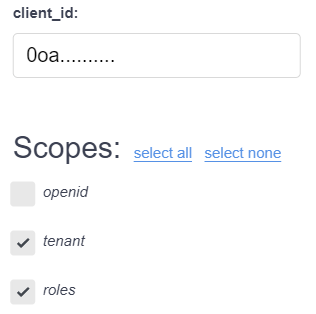
- Once logged in, use the
POST /client-credentialsAPI to create the user-specific, programmaticCLIENT_IDandCLIENT_SECRET. - Store the secret value returned, as it is impossible to retrieve this value after it is created.
With these credentials, you now are able to use them for programmatic authentication.
Authenticating with Programmatic Client Credentials
Authenticating with a user-specific CLIENT_ID and CLIENT_SECRET means making a request to Okta for an access_token. The code below shows how to authenticate and make a request to the Physna API using cURL.
- Add your
CLIENT_IDandCLIENT_SECRETas variables. Usereadto securely enter the secret.export CLIENT_ID="0o...(replace with your programmatic client id)" read -s CLIENT_SECRET -
Use cURL to get the
access_tokenfrom the JSON response.curl --request POST \ --url https://physna.okta.com/oauth2/default/v1/token \ --header 'accept: application/json' \ --header "authorization: Basic $(echo -n "$CLIENT_ID:$CLIENT_SECRET" | base64 -w0)" \ --header 'cache-control: no-cache' \ --header 'content-type: application/x-www-form-urlencoded' \ --data 'grant_type=client_credentials&scope=tenantApp roles' # Response: { "access_token":"eyJraW...", "token_type":"Bearer", "expires_in":36000, "scope":"roles tenantApp" }
Examples of Making an Authenticated Request
With the access_token from the authentication above, you can make requests to the Physna API.
The below example assumes that you have set the TENANT into a $TENANT variable, and the access_token into an $ACCESS_TOKEN variable.
Authenticated requests use Authorization headers with Bearer tokens. This example makes a request to the V2 /models endpoint.
curl --request GET \
--header "accept: application/json" \
--header "Authorization: Bearer $ACCESS_TOKEN" \
https://api.physna.com/v2/models